Showing posts with label karon thackston. Show all posts

Friday, 16 December 2016

How to Sell More Amazon Products 

Through Differentiation


By Karon Thackston


A little over a year ago, I met Chris Guthrie online. “Keen” doesn’t even begin to describe the level of common-sense smarts Chris has when it comes to successful Amazon sales. The fact that he created the AmaSuite collection of seller tools (and made it available to the public) so others can follow in his footsteps only goes to show the standard by which he lives. I’m excited to have Chris back as a guest on the Marketing Words blog and I know you’ll be enlightened by what he’ll share today.
——————————————
One major mistake new Amazon sellers make is creating a “me too” product.
What does this mean? It’s defined as creating a product that’s exactly like the competition but doesn’t add any extra value. These sellers forgo differentiating their products and simply ask the manufacturer to add a new label. This is not the way to build a great sellable brand.
With just four steps, I’d like to outline how to differentiate your product with a methodology I’ve applied from the beginning of my Amazon sales career … successfully!
Step 1: Find What’s Working
The best way to see what’s working well is to look at the Best Sellers category for a product. Take note of the product images and you’ll quickly see what’s drawing people in.
If we look at the six best sellers for “grill brushes” (aka BBQ brushes), here’s what we see:
● Most of the top sellers have thick bristles with multiple rows.
● A lot of the titles say “18 inches.”
● Every listing except one has 5 bullet points.

Step 2: See What’s Not Working
Reviews are and will continue to be a goldmine. It’s the best opportunity for finding what people like and dislike about a product in their own words.
The BBQ brushes in the first, third, and fourth positions look quite similar and would be a perfect example of applying differentiation through analyzing reviews. They’ve all got thick bristles, are 18 inches long, and — best of all — there are 2,896 reviews for us to look at.
Yes, that’s a lot of reviews and certainly a healthy amount of time. But it’s the upfront work you’ll need to get moving in the right direction.
Flaw #1: Bristles end up in food

Flaw # 2: Bristles not long or wide enough for infrared BBQs

Flaw #3: Handle breaks easily

This just goes to show that no matter how well a product is selling, you can always find improvements to meet demand.
Next, we need to understand which is the most important differentiation to pursue because that naturally leads us into our ideal BBQ fanatic.
Step 3: Aggregate Your Findings
As you look through the reviews, you’ll start to see very clear buckets. Your picture of a disgruntled customer will take shape and it’ll start to become very clear which problem you should attack first.
In our case, BBQ brush bristles falling off is a major problem and has the chance of causing major health problems — none of which we want to be responsible for. So now it’s time to unleash a bit of creativity into your own findings…
Ask yourself this question:
What is one thing I can change to this product that would make this product better?
Often, with physical products, it can be as simple as the material, packaging, or dimensions. Think of the smallest leverage point to allow the biggest impact for your customer — and your business.
Once you’ve answered that question and determined which modification is the most important to your product, you’ll need to find a manufacturer. More specifically, one that’s already producing BBQ brushes similar to what we’re looking for.
If you haven’t done this before, you’ll need to follow a few guidelines so you know what you’re talking about.
Step 4: Find Your Manufacturer (Remember to Be VERY Specific)
Finding the right supplier to source your product from is an entirely separate conversation, but typically you can find a supplier via Alibaba.com if you’re just starting out. The key is to make sure the supplier you work with is receptive to making changes to the product for you so that you can release something that is truly differentiated.
A few things before we go:
When you contact the supplier, be as descriptive as possible about what you’re looking for. This includes the size of the pallet, order quantity and, of course, your modifications. Try to communicate as many as possible.
Many of the strategies I use to produce a differentiated product can take a lot of time, but that’s the reason why I built AmaSuite. One of the software tools available inside AmaSuite helps you analyze every review for a single product and look for frequent combinations of the same words. With this information you can quickly determine some of the commonest complaints customers have about a product, as well as what people like the most.

Monday, 17 October 2016

Getting Amazon Reviews Using Follow-Up Emails

Now that Amazon has outlawed the use of incentivized reviews, you'll need a solid email follow-up series to help generate this all-important element of your sales strategy. Here's what we do at Marketing Words to boost reviews for our Amazon clients.


Saturday, 10 September 2016

How to Get Amazon to Pay for Your Destroyed Inventory


By Karon Thackston


Have you ever heard of Elaine Heney? I got an email from her a little while back. She wanted to discuss how her methods of getting reimbursements from Amazon had landed her over $6,100 that she didn’t even know she was owed. That got my attention!
Her process is so simple that I asked her to share part of it with you so you could see:
1. That Amazon isn’t always diligent about getting reimbursements to sellers for destroyed items.
2. That you may very well be owed a good deal of cash for inventory that Amazon has destroyed for one reason or another.
3. That you may also have money coming to you for damaged, lost or other types of inventory — IF you ask for it.
After going through what Elaine references below, I was sent a reimbursement email from Amazon telling me I’d gotten $68.80. It took about 5 minutes. Wanna give it a try? Keep reading! Take it away Elaine…
===========================================
I started selling private labels products on Amazon just under a year ago. Like most Amazon businesses I was working crazy hours researching new products, contacting suppliers, getting in samples, applying for brand registry, launching products on Amazon.com and in five European countries, handling customer service and making sure everything was running smoothly.
One thing I didn’t handle was my reimbursements. I knew from listening to the grapevine, that Amazon doesn’t always automatically process refunds if they damage or destroy inventory that you shipped to their warehouses. Sometimes Amazon loses products and occasionally Amazon can overcharge the FBA fees on products they sell.
On one hand, Amazon has a HUGE amount of units in all their warehouses so I understand how small things can fall through the cracks. From my FBA seller’s perspective, however, if Amazon owes me money because of missing or damaged stock, then I would really like to get the reimbursement! Wouldn’t you?
If you have ever looked at the reports in Seller Central, you know they are not simple to figure out. So I sat down one day just to see if I could somehow get a handle on how much (if anything) Amazon owed me that they hadn’t paid me for.
Within a couple of days, I had received over $2800 back from Amazon USA & Amazon UK. In another week, this figure had risen to over $6100 in missing refunds! Now, filing for various types of refunds is a part of my regular Amazon business routine and it almost always brings in additional cash that would have otherwise been lost. And all I had to do was ask!
Let me show you my ultra-simple process for determining if you have any inventory that Amazon has destroyed and how to get paid for it.
The first step is to check to see if they have reimbursed you for destroyed inventory already.
1. Log into Seller Central.
2. At the top of the page, hover your mouse over ‘REPORTS’ and click ‘FULFILLMENT’.

3. On the left of the screen, under ‘INVENTORY’ click on “show more.”


4. Click on ‘Inventory adjustments’.

5. Select: reason group = DESTROYED.
6. Select: event date= Last 365 days (or longer if you need to, whenever you started your business).

7. Click “generate report.”
8. Each order listed may (but not always) qualify for refund.
9. Take a screengrab (picture) of this Seller Central screen.
10. Then download the inventory adjustments report by clicking on DOWNLOAD. Select EXACT DATES, and put in the start date for your business (I put in the date before I started to sell on Amazon) and the end date (today’s date).

11. Save the downloaded ‘destroyed inventory’ file to your computer.
12. Open the file in a spreadsheet program and put a filter on the top row.
13. Look at the column REASON.
14. Use the filter so it only shows letter D and the number 5. These are some of Amazon’s adjustment codes. (See below.)
15. This is your list of destroyed products.
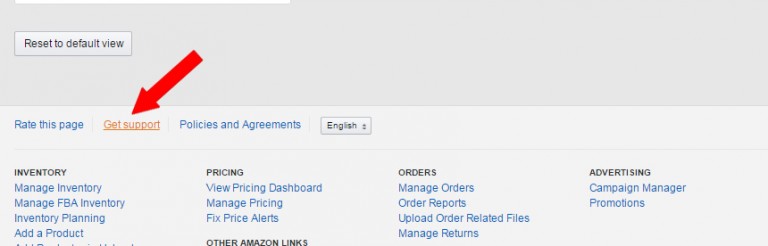
16. To apply for a refund, scroll to the end of the page in Seller Central and click on ‘Get Support’.

18. Click on ‘Selling on Amazon issue > FBA issue > Something else.’
19. Write Amazon this message:
Hello,
Could I get reimbursed for the items destroyed by Amazon? See the attached list of the inventory items that have been destroyed.
Thank you. Have a great day!
20. Attach either the downloaded ‘destroyed inventory’ file to the message, or attach the screengrab you took earlier.
21. Send the message to Amazon.
Amazon will usually reply within 24-48 hours.
This is Just 1 Way to Get Refunds from Amazon. There 8 More Methods!
When I started this process I had expected to only get back a few hundred dollars.
It completely took me by surprise to get back over $6,100, using this and 8 other methods that I have documented so far.
I’ve put together a full series of step-by-step, walkthrough videos and PDFs going through the exact process I followed to get over $6,000 back from Amazon USA & Amazon UK.
Choose from 3 Options Offering:
• Rocket Refund Manual for all 9 methods with screenshots & detailed guides
• Amazon FBA email templates that I used to claim over $6,100
• Full library of walkthrough videos showing every step of the process
• Private Facebook group so you can ask questions and share your successes
Get Rocket Refunds today and see how much $$$$ you get back.
If you have been selling on Amazon for more than 6 months there is a very good chance that Amazon owes you money.
Today is the day to claim those funds quickly and easily!
- Really good stuff to know! Leave a comment below!


Sunday, 14 August 2016

Wish You Could Have More Sales Automatically? Here’s How to Make It Work

By karon thackston


I’ve known Jen Perdew for years. She’s one of the smartest and hardest-working women I know. I heard her speak several months ago at a live event about the topic of driving more traffic and sales automatically, and was inspired. So I’ve asked her to give us an overview of the topic and how the basics might work for digital and physical products. PLUS, Jen has an invitation to her free 4-week webinar workshop on this topic, which I’ve already signed up for! Jen…take it away…
As entrepreneurs, we are busy people. There is never a shortage of things to do, one of which is generating prospects / customers / sales for our businesses. Whether you sell digital products via your site or physical products via Amazon or eBay, generating sales can be a fulltime job, unless you enter a magical place called “Automated Nirvana.”
Some say it’s a mythical land of rainbows and unicorns. Some say only bazillionaires live there. Some say it simply DOES NOT exist at all. Let me tell you exactly what it is and you can decide for yourself.
Automated Nirvana is reached when I make sales overnight because I have a predictable, automatic system in place to make that happen. There are no surprises here. Most people aren’t sure why they’re making sales (if they are at all), so they can’t replicate the process. That’s not a system; it’s a fluke.
That leaves the questions: Why did someone buy THAT product? How did they find you? What link did they click?
To find the answers and start generating predictable, reliable, automatic sales, you have to stop guessing and build a system.
There are two ways to sell your products or services.
  1. Promote every single day. That means you MUST mail your list, or run promos to make money. That gets old quick because it takes a lot of your time and (frankly) your target customers probably get tired of it, too.
  1. Set up automated systems that logically and systematically move your buyers through awell-thought-out funnel that drives traffic, leads, conversions, sales, and profits every minute of the day without your having to touch it.
I opt for number 2 all day long.
Instantaneous? No. Permanent & Reliable? YES!
For years, I emailed promos every single day to drive revenue. It was the only way I knew to reach my audience and boost sales. Now, however, I automatically send relevant, high-value content that moves my leads through the sales funnel that best meets their needs and offers them the products and services they want based on their actions.
How Sales Funnels Work and Why You Absolutely Must Have Them in Your Business
How do YOU buy a product? More than likely you’ve somehow been introduced to the company you’re purchasing from through some kind of free content.
It could have been a blog post, free report, cheat sheet, etc. That free content is the first step in a sales funnel.
There Are 3 Main Pieces to a Product Sales Funnel
  1. Freebie — An introductory gift is offered to entice people to get to know you and your company. This could be any of the ideas mentioned above or something else you come up with. It should be a digitally deliverable item so that you don’t have to manually ship anything.
  2. Content — Once a person provides his or her email address in exchange for your freebie, then you can begin communicating with them directly, sending them valuable tips, information, and more that will keep them interested in what you have to offer.
  3. Sales! — If done effectively, your freebie and content will guide the prospective buyer to the point of purchase, and you begin to make sales … hands-off, automatic, consistent, reliable sales!
What’s Another Name for “Sales Funnel”? Relationship Building 🙂
Because you go through the digital process of building a relationship with leads, they trust you, find that what you’ve already provided (free) is valuable, and decide to purchase paid products from you that they now believe will offer what they are looking for.
Whether you are selling physical products via Amazon or digital products such as training courses, sales funnels are proven to produce phenomenal results IF they are set up correctly.
Is it hard to plan out and set up sales funnels that work? Not the way we do it at MyNAMS. We’ve whittled the process down into easy-to-understand steps that we’ll even walk you through live during our free 4-week workshop called “Sales Funnel Leverage.”
By the end of the 4 weeks, you’ll have created your very own basic Strategic Business Funnel and at least one Product Funnel to use so you can generate passive income. (Yes! You will have opened the doors to Automated Nirvana!)
Are you a really hard worker? You could create 10 funnels in 4 weeks if you want.
We’ll have a webinar and an action plan for each of the 4 weeks. Then we’ll do live evaluations of your funnels in order to fine-tune them and get them ready to launch.


Thursday, 11 August 2016

Amazon Is Suppressing Titles (And Other Information You Need to Know)


By Karon Thackston

Almost a year ago, I wrote a blog post entitled Amazon Cleans Up Confusing Title Policies: Changes Underway. One of the bits of information I included was from an email Amazon sent out to sellers warning that they were implementing a title suppression policy for any titles over 200 characters. Supposedly, as of July 15, 2015, this went into effect.
So … we waited with no visible indication that the hippo-sized titles that had taken over numerous categories in Amazon were going away. After many months, sellers began to believe that (once again) what Amazon said and what they did were two different things. But then it happened…
With an algorithm update that allegedly took place a couple of months ago, sellers began to rant that their listings were simply disappearing from the search results pages. At first I thought this might have been due to people getting seriously carried away with the new5,000-character search term change. (That could still be part of it.) However, I recently had two conversations with two different Seller Support reps (in two different departments) and both mentioned the “Suppression Rule.” Apparently, this long-forgotten policy change had finally been implemented.
What Amazon’s Suppression Rule States
According to Amazon (in the email from July of last year and Seller Support messages from recently), any title in any category that is over 200 characters will be suppressed from the search results. Please note: It doesn’t say “removed” from the search results — it says “suppressed” (stifled, censored, buried).

As you can see from the Seller Support message above, Amazon still has a lot of conflicting information in their system. Currently, you’ll see many categories where the Add-A-Product section states you can have a maximum of 250 characters for your title. I’ve found some that say you can have 500 characters, which I know is WAY wrong. However, titles over 200 characters are definitely being suppressed. And Amazon needs to clean up its act.
Spot Checking
To see whether Amazon had really (finally) put this rule into place, I did a little spot checking through several categories. This was by no means a comprehensive review, but just a quick look to see how many titles that exceeded 200 characters I could find on page one of the search results.
I started with the categories that had been badly abused, such as Kitchen and Personal Care. Out of approximately 50 listings that I checked, two had titles that were slightly longer than 200 characters. (One was 205 and one was 210.) Even in the Supplement subcategory, 99% of the excessively long titles for products such as Garcinia Cambogia had been shortened to under 200 characters.
If Your Listing Has Disappeared…
The first thing I would look at is whether your current title is over 200 characters. Regardless of what the Style Guide, Add-A-Product, or the flat files say, do not use titles that are over 200 characters. (Some categories have shorter title requirements, such as Beauty, which is (for the moment) at 80 characters.)
Other Title Changes
It would appear that Amazon is having issues in other categories as well. Electronics-oriented categories (including cell phones, cell phone accessories, laptop backpacks, etc.) now show this. The total amount of space is for 2,000 characters. (Add the characters already typed into the box to the 999 it shows are left and you get 2,000.) Not much of a “short” title, is it?

I’m thinking this is a typo. Beauty had this glitch a while back — it was indicating that sellers could have 500-character titles instead of 50 (what it used to be).

If you see these … ignore them. Anything over 200 characters will almost certainly get your listing suppressed.
Will You Do Me A Favor?
Help a gal out, won’t you? I have been working with Amazon for over a year to try to get all the information in all the various places to match. Having more sellers bring this to their attention would be extremely helpful!
If you see that Add-A-Product states you can have 250 characters in the title, write to Seller Central and ask them to have this changed because Amazon’s Suppression Rule indicates all titles over 200 characters are not showing in the search results.
- Have you noticed any changes on your listings on Amazon? Share with us any experience you've had with this below!

Wednesday, 3 August 2016

14 Ways to Spice Up Your Amazon/Ecomm Product Descriptions


By Karon Thackston

Welcome Marcia Yudkin to the Marketing Words Blog! 
Thanks for sharing your inspiring creativity to help ecomm and Amazon sellers boost the power of their product descriptions this holidays season. Take it away, Marcia…
“Nicknamed ‘America’s Bechamel,’ Cream of Mushroom Soup is…”

This surprising comparison caught my eye on an old Thanksgiving-themed Trader Joe circular I found, prompting me to skim the rest of the text-heavy flyer. Béchamel is French for the white sauce that is a foundational element in traditional upscale cuisine. Cream of mushroom soup is a decidedly downscale item, used in casseroles by cooks who prefer easy to elegant. Putting the two together in one sentence is bold and makes the reader rethink the use of an extremely ordinary item.

The Trader Joe’s flyer turned out to be full of scrumptious descriptions, using a wide range of techniques for adding sizzle to everyday products. Whether you sell office supplies or pet accessories, flooring or lingerie, you can borrow the angles their writers used to invigorate product blurbs and headlines on your own site or on Amazon with fascination and flavor.


For example:

#1 Historical Reminder [Fried onion pieces] “These crunchy savories came into the limelight with the 1960s debut of the green bean casserole.”

Let’s consider how this approach – used factually or fancifully – could spice up other kinds of products.

Wine aerators: “Since 1680, wine connoisseurs have understood the importance of exposing wine to air before drinking it.”

Laptop computers: “Who would have thought this 1981 fad would overtake desktop sales?”

Handkerchiefs: “Someone told us that Napoleon had one like this in his pocket to wipe his tears when he got defeated at Waterloo.”

As you read through the rest of the list, be thinking of how you might add some of these twists to turn boring copy into writing that makes your catalog mouthwateringly enticing.

#2 Little-Known Fact [Fresh cranberries] “One of only three fruits native to America…”

#3 Saving the Day [Frozen mashed potatoes] “This frozen side is a chef’s back-pocket wonder.”

#4 Startling Comparison [Brussels sprouts stalks] “With an appearance similar to Christmas trees, these herald the start of the season.”

#5 Elaborate on Simplicity [Whole kernel corn] “Non-genetically-modified, Midwest-grown, supersweet corn – it’s as tried and true as it sounds.”

#6 Who is the Product Especially Good for? [Gravy] “For the ‘from scratch’ crowd, our Turkey Broth and a pan of drippings can be whisked into delicious gravy rather easily.”

#7 Who are the Product’s Devotes? [Whole cranberry sauce] “We know more than a few people who stock up on this seasonal sauce and freeze it to enjoy all year long.”

#8 Indulgent Word Play [Cranberry, walnut and gorgonzola dressing] “Some of our favorite festive flavors fortuitously flow forth in this simultaneously versatile and vivacious vinaigrette.”

#9 Company History [Breaded Turkey-less Stuffed Roast with Gravy] “Elevating the experience for those who prefer a non-traditional turkey entrée has always been part of our holiday agenda.”

#10 Quote [French truffle chevre] “’There are two types of people who eat truffles: those who think truffles are good because they are dear and those who know they are dear because they are good.’ – Jean-Louis Vaudoyer”

#11 Drumroll [Truffle salami] “Ready the crackers, slice the cheese, and prepare your palates. Trader Joe’s Truffle Salami is making its premier appearance now.”

#12 The Item’s Popularity [English toffee] “This is a big 20 ounce canister of Toffee that has become an iconic item at Trader Joe’s for a limited time.”

#13 Scene-Setting Monologue [Iced cranberry orange scone cookies] “You’ve loosened the belt, you’ve taken a few deep breaths… there is just enough room for a nibble of something sweet.”

#14 Psychology of the Season [Gingerbread pancake mix] “Hustle and bustle can be stressful. Ginger, according to many, is calming, relaxing and rejuvenating. So when the hurry-up has you feeling down…”

Are you hungry yet? Excited about applying some of these ideas in your own promotional writing? Just remember not to get carried away. It’s great fun to let your creativity go, and as long as you don’t over-spice your concoction, you’ll end up with a captivating description that amuses, interests and absorbs the reader, paragraph after paragraph, as it sells.
- We're excited to try out these great ideas for copy on our products! What about you?

Tuesday, 26 July 2016

Top 12 Tips for Creating Amazon Product Listings that Outsell the Competition

By Gen Furukawa

Copywriting is the easiest way to boost your Amazon sales quickly and efficiently, increase your conversions, improve your Best Sellers Rank & generate more profits. There is no upfront capital required to create a listing that is compelling, unique, and persuasive. However, there is a formula and strategy to piece together the words that can turn a visitor to your page into a happy customer.
The skill of copywriting is especially important in Amazon’s crowded marketplace, where products can be nearly identical and the shoppers’ attention span is incredibly short.
In this value-packed webinar, Amazon copywriting expert Karon Thackston shares 12 tips to take your copy from a run-of-the-mill block of text to a polished and professional Amazon listing. These are the same techniques that Karon’s team at Marketing Words uses to produce million-dollar-selling listings for clients.


(SOURCE)

- Great, informative webinar! What did you guys think?