Tuesday, 13 September 2016

10 Things You Need to Know For A

Profitable Q4

By Stephen

Q4. For an online seller, it’s the most wonderful time of the
year. Sales and profits seem to go through the roof as more
and more people buy stuff online for the holidays. If you’re
just assuming that Q4 is going to be great for you but you’re not doing anything differently, then you might miss out on some amazing opportunities to increase your Q4 profits. The following are 10 things you need to know about Q4.

1. For those of you experiencing your first Q4, you might be worrying that your sales have not yet really increased as much as you thought. This is because while the business world sees Q4 as October to December, Q4 for the Amazon sales world is actually November to January.Don’t worry… Amazon Q4 really starts to gear up in November and will go absolutely crazy in December.

2. While the bulk of Q4 sales happen in December, many sellers (including myself) have found that January can be almost as profitable as December is. As long as you still have lots of inventory, you will still sell a lot in January. Why? Because people are finally going to Amazon and getting what they actually wanted for Christmas. Not only that, but everyone will be using their Amazon gift cards they received on Christmas day. Be sure your inventory is still well stocked for January, so you don’t miss out on the last month of the Amazon Q4.


3. What I deem as acceptable sales ranks for inventory purchases changes a lot during Q4. While I might shy away from a toy ranked 200,000  to 300,000 during the summer, I’ll almost always buy that item as Q4 is approaching. Why?During Q4, the sales velocity increases exponentially. So while a toy consistently ranked 250,000 might sell only twice a month… come December of Q4, that same toy might sell once a day.

4. Many Amazon sellers start to freak out a bit when they get an email from Amazon about their “Holiday Selling Guidelines for the Toys & Games category.” For those who don’t know, Amazon decides which sellers are eligible to sell in Toys & Games category during the holiday season. Sellers worry that they might not be approved to sell toys during the holidays and begin to stress out. One thing that Amazon needs to do a better job of is communicating that these guidelines only pertain to Amazon sellers who are selling MERCHANT FULFILLED toys. If you are selling toys via FBA, then you are automatically approved to sell toys during the holiday sales season. Again, these guidelines only apply if you are mailing your inventory directly to the buyer (merchant fulfilled).


5. If you reprice your inventory on a regular basis (either manually or with an online repricer) then I might suggest stopping, or at least slowing down. Sales start to increase during Q4 so much that an item that sells for $14 today (early October) might potentially sell for $30 a month from now. Take a moment and research your item on CamelCamelCamel and see if the price of that item tends to go up during Q4. If it does, leave your price alone and make more profits than if you lowered your price. You might even want to raise some of your prices.

6. Many of you wonder if you should try to focus on reselling the toys from each store’s “Holiday Hot Toy” list. My personal plan of attack is to avoid most of these toys. My reasoning is this: If a store tells you what toy will be the “hot” toy this holiday season, then it’s reason enough to assume that the store will be heavily stocked with those particular toys. The toys that you want to find to resell during Q4 are the toys that will be harder to find come December. If you’re interested in learning more about the Q4 strategy that I’m learning and implementing this year, then check out Jim Cockrum’s Proven Q4 Plan.


7. Want to save even more money on the stuff you want to sell in Q4? Buy discounted gift cards. I personally love raise.com and cardpool.com, but there are other sites out there that do the same thing. I’ve bought $100 Walgreens gift cards for $75… that’s $25 in free sourcing money! Find other great gift cards from stores like Target, TJMaxx, Tuesday Morning, Big Lots, Walmart, and more!If a store offers gift cards, then most likely you can get some free money to source with by purchasing discounted gift cards.

8. Stock up on supplies! When everyone is in the thick of Q4 madness, you don’t want to suddenly discover that you have run out of 3-inch packing tape, Dymo labels, suffocation warning labels, or any other supply that is necessary to run your business. Stock up today while you have the time.

9. Nobody likes returns, but just remember this: With increased sales come increased returns. There is no avoiding it. There will also be an increase in warehouse and distributor damaged items, as well as warehouse lost items. It’s ok. For most situations, Amazon will reimburse you for the items they lose or damage. Important: Don’t just assume that these reimbursements will be automatic. Make sure that Amazon not onlyreimburses you for items they lose, but that they also reimburse you for items your customer never actually returns.
10. When Q4 hits, some resellers go into overdrive and spend every waking hour sourcing, buying, prepping, and shipping. They sometimes forget about what’s really important: family. Don’t let the dollar signs blind you. Look around and spend quality time with your family. Remember what the Thanksgiving and Christmas seasons are truly about and reflect upon God’s great gift to us all. When we remember what’s truly important, it gives us the right perspective. And that’s more important than any Amazon payout could ever be.
I hope these ten tips will help you have a profitable and meaningful Q4. If you’d like to share more tips about this most wonderful time of the year, please feel free to comment below. I’d love to hear how you make the most of Q4.
- We're officially in Q4! Here are some tips to make it a happy one! 

Monday, 12 September 2016

Amazon FBA Recipe for Success!


- Share your thoughts on this video by leaving a comment below!

Top 4 Tips For Creating A Profitable Product Page On Amazon

By The Selling Family

After you have been selling on Amazon for awhile you will most likely come to a point where you need to create a product page on Amazon in order to sell an item.  Whether it is a private label product, new to market retail arbitrage product or even your own unique bundle.  These are all great examples of times when you will want to make your own listing on Amazon.  Bringing these types of product pages to Amazon can be very profitable.  But the key is you have to do them correctly.
There is nothing worse than creating a product page on Amazon and then having it just sit there!  Talk about wasted time, wasted energy and even wasted money on product that is just sitting around not selling.
Over the years that I have been selling on Amazon, I have seen some really bad listings. Ok, truth is, I’ve even created some really bad ones!  I’ve seen (and I’m sure you have too) product pages on amazon that have keyword spammed titles, bullet points that are paragraphs long (they are called bullet POINTS), no product descriptions and even images that leave me simply confused as to what I will receive when I place the order.  
Our main goal here at The Selling Family is to make sure that you are able to succeed and be the MOST profitable possible selling on Amazon.  So, in order to get you started created profitable product pages on Amazon here are my

1.  Creating A Product Title That Answers The Important Questions

What is the first thing that you read on a product page?  The title!  This is the part of a page where someone makes the decision if they even want to continue on and see what this item has to offer.  The title should give the buyer enough information to make a sound choice on purchasing your product.  All the main details should be included.  Brand, Model, Size, Quantity, Colors, Patterns, Etc.  The key is to include the important stuff and leave out the fluff.  Keep it short and sweet.  
Don’t get caught doing this:

2.  Writing Bullet Points That Highlight The Best Parts Of Your Item
The bullet points are the second place on a listing that someone is going to read.  They should know right away after reading the bullet points if the product you are offering has what they are looking for or not.  Your bullet points should highlight the major features of your item.  We want to answer their questions before they even think of them.  This is just leading the buyer through the final process of deciding to purchase your product.
Does this make you feel like this is an awesome product to purchase?

3. Product Descriptions Help The Buyer Know How They Will FEEL 

So you have gotten the buyer this far.  Now, it’s time to close the deal.  Use this section to write about how the buyer will feel or what they will experience when they purchase your product.  If you have any last details that you need to share or important facts about the company or product, this is where they should go.  

4. Keywords And Search Terms Are What BRING YOU The Buyers

Keywords and Search Terms are a very misunderstood aspect of creating product listings on Amazon.  This is why we end up with spammy titles and products showing up in irrelevant searches.  Sellers are just dumping every keyword they can think of in the search terms, whether they fit or not.  Plus they think that if the title has a bunch of keywords in it, they will show up first in results.  NOT THE CASE.  
Keywords should be positioned neatly throughout your listing in appropriate places.  Your title should not have extra words just to get keywords included.  The search terms are where you get those extra keywords that are relevant to your Amazon product page.

Overall there are 8 key elements to making a profitable product page on Amazon.  If you would like step by step instructions on creating your own product listings check out our Profitable Pages video course.

- I definitely agree that a good product page does wonders for sales. How about you?

Saturday, 10 September 2016

How to Get Amazon to Pay for Your Destroyed Inventory


By Karon Thackston


Have you ever heard of Elaine Heney? I got an email from her a little while back. She wanted to discuss how her methods of getting reimbursements from Amazon had landed her over $6,100 that she didn’t even know she was owed. That got my attention!
Her process is so simple that I asked her to share part of it with you so you could see:
1. That Amazon isn’t always diligent about getting reimbursements to sellers for destroyed items.
2. That you may very well be owed a good deal of cash for inventory that Amazon has destroyed for one reason or another.
3. That you may also have money coming to you for damaged, lost or other types of inventory — IF you ask for it.
After going through what Elaine references below, I was sent a reimbursement email from Amazon telling me I’d gotten $68.80. It took about 5 minutes. Wanna give it a try? Keep reading! Take it away Elaine…
===========================================
I started selling private labels products on Amazon just under a year ago. Like most Amazon businesses I was working crazy hours researching new products, contacting suppliers, getting in samples, applying for brand registry, launching products on Amazon.com and in five European countries, handling customer service and making sure everything was running smoothly.
One thing I didn’t handle was my reimbursements. I knew from listening to the grapevine, that Amazon doesn’t always automatically process refunds if they damage or destroy inventory that you shipped to their warehouses. Sometimes Amazon loses products and occasionally Amazon can overcharge the FBA fees on products they sell.
On one hand, Amazon has a HUGE amount of units in all their warehouses so I understand how small things can fall through the cracks. From my FBA seller’s perspective, however, if Amazon owes me money because of missing or damaged stock, then I would really like to get the reimbursement! Wouldn’t you?
If you have ever looked at the reports in Seller Central, you know they are not simple to figure out. So I sat down one day just to see if I could somehow get a handle on how much (if anything) Amazon owed me that they hadn’t paid me for.
Within a couple of days, I had received over $2800 back from Amazon USA & Amazon UK. In another week, this figure had risen to over $6100 in missing refunds! Now, filing for various types of refunds is a part of my regular Amazon business routine and it almost always brings in additional cash that would have otherwise been lost. And all I had to do was ask!
Let me show you my ultra-simple process for determining if you have any inventory that Amazon has destroyed and how to get paid for it.
The first step is to check to see if they have reimbursed you for destroyed inventory already.
1. Log into Seller Central.
2. At the top of the page, hover your mouse over ‘REPORTS’ and click ‘FULFILLMENT’.

3. On the left of the screen, under ‘INVENTORY’ click on “show more.”


4. Click on ‘Inventory adjustments’.

5. Select: reason group = DESTROYED.
6. Select: event date= Last 365 days (or longer if you need to, whenever you started your business).

7. Click “generate report.”
8. Each order listed may (but not always) qualify for refund.
9. Take a screengrab (picture) of this Seller Central screen.
10. Then download the inventory adjustments report by clicking on DOWNLOAD. Select EXACT DATES, and put in the start date for your business (I put in the date before I started to sell on Amazon) and the end date (today’s date).

11. Save the downloaded ‘destroyed inventory’ file to your computer.
12. Open the file in a spreadsheet program and put a filter on the top row.
13. Look at the column REASON.
14. Use the filter so it only shows letter D and the number 5. These are some of Amazon’s adjustment codes. (See below.)
15. This is your list of destroyed products.
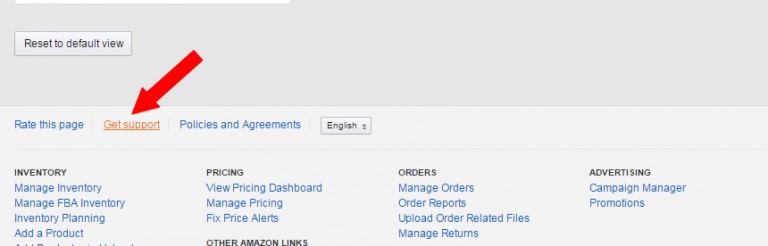
16. To apply for a refund, scroll to the end of the page in Seller Central and click on ‘Get Support’.

18. Click on ‘Selling on Amazon issue > FBA issue > Something else.’
19. Write Amazon this message:
Hello,
Could I get reimbursed for the items destroyed by Amazon? See the attached list of the inventory items that have been destroyed.
Thank you. Have a great day!
20. Attach either the downloaded ‘destroyed inventory’ file to the message, or attach the screengrab you took earlier.
21. Send the message to Amazon.
Amazon will usually reply within 24-48 hours.
This is Just 1 Way to Get Refunds from Amazon. There 8 More Methods!
When I started this process I had expected to only get back a few hundred dollars.
It completely took me by surprise to get back over $6,100, using this and 8 other methods that I have documented so far.
I’ve put together a full series of step-by-step, walkthrough videos and PDFs going through the exact process I followed to get over $6,000 back from Amazon USA & Amazon UK.
Choose from 3 Options Offering:
• Rocket Refund Manual for all 9 methods with screenshots & detailed guides
• Amazon FBA email templates that I used to claim over $6,100
• Full library of walkthrough videos showing every step of the process
• Private Facebook group so you can ask questions and share your successes
Get Rocket Refunds today and see how much $$$$ you get back.
If you have been selling on Amazon for more than 6 months there is a very good chance that Amazon owes you money.
Today is the day to claim those funds quickly and easily!
- Really good stuff to know! Leave a comment below!


Saturday Tips For Selling On Amazon FBA - Stop Worrying


- Stop worrying! Watch this for some good advice