Showing posts with label brand restrictions. Show all posts

Saturday, 17 December 2016

How to Check Your Brand/Product 


Restrictions Before You Buy for Amazon


By 888 Lots


We couldn’t be more excited to announce our latest feature. As most of you already know Amazon made some major changes to their FBA program by adding additional fees for the third party sellers.
The new Amazon brand restrictions fees are here and they will change the marketplace, for good or bad we will have to see. What is more important now is the questions that every Amazon seller asks himself.
For what brands and products I am restricted?
How can I find good merchandise for my online business that will be not restricted?
Well, once again 888 Lots is the answer to your questions. We can say that we are the FIRST WHOLESALER in the business that can tell you what products are restricted before you are surprised.
Thanks to our latest feature, now we can show you exactly how many of the products in our LOTS are restricted and how many are OK to be sold on Amazon, based on your profile settings.
There are some main restrictions types that you are going to see, based on your Amazon Seller Profile:
  • Products that are brand restricted.
  • Products that are category restricted.
  • Products that are restricted by ASIN number.
  • Products that are gated.
Our customers are extremely important for us and our team is determined to provide you the best possible buying experience. With our latest feature we are one more step closer in our journey to become the most advanced liquidation platform on the market.

Now you can login on 888 Lots liquidation platform and:

  • Check our LOTS for restrictions based on your Amazon seller profile.
  • Calculate the estimate profit after fees.
  • Negotiate the price of our LOTS.
  • Request LOT evaluation by ScanPower.
  • Create your own custom LOT.
  • Take advantage of our FBA program.
  • And more.

How Can I Check My Restrictions on 888 Lots?

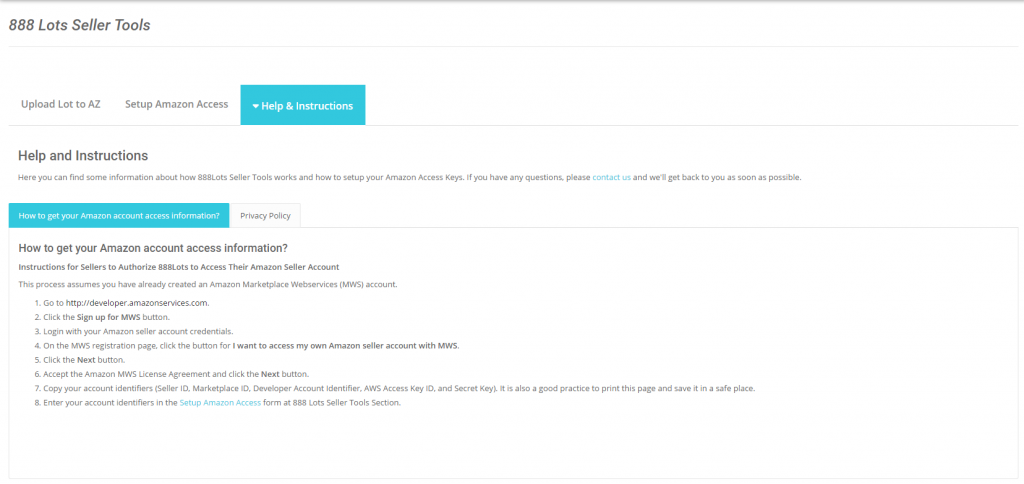
First you will need to obtain your special key from your Amazon MWS.
How to get your Amazon account access information?

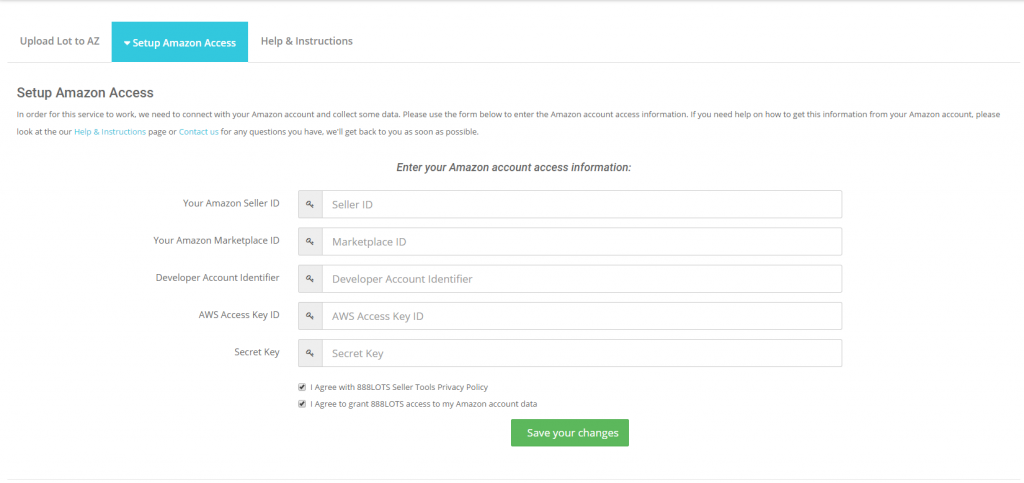
After you obtain your keys then you need to enter the information in our “Setup Amazon Access” Tab.
Enter your Amazon account access information

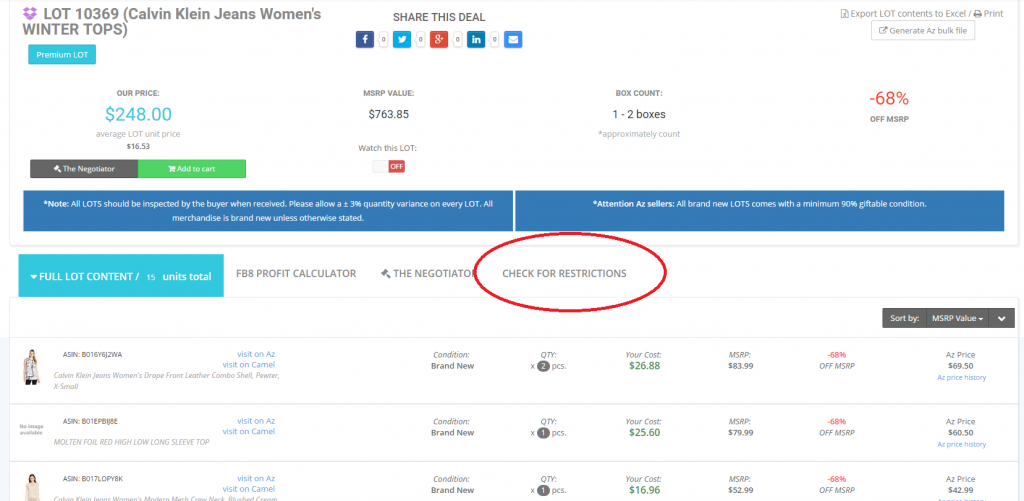
After you enter your information and you press “Save your changes” button you are good to go and you can now check our LOTS for restrictions. On each LOT you are going to find one more additional tab called “Check for restrictions”.

check for restrictions

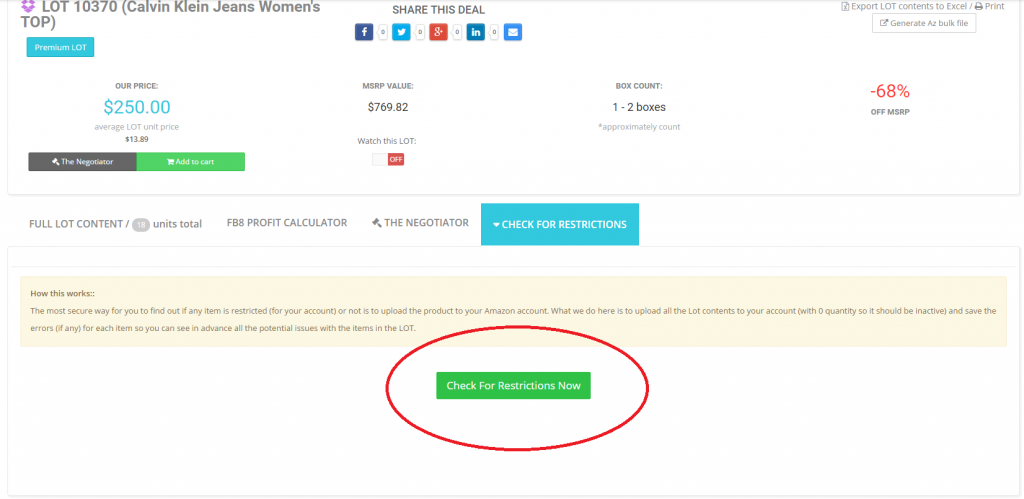
Once you press it you can request to check the LOT for restrictions.
checkforrestrictions
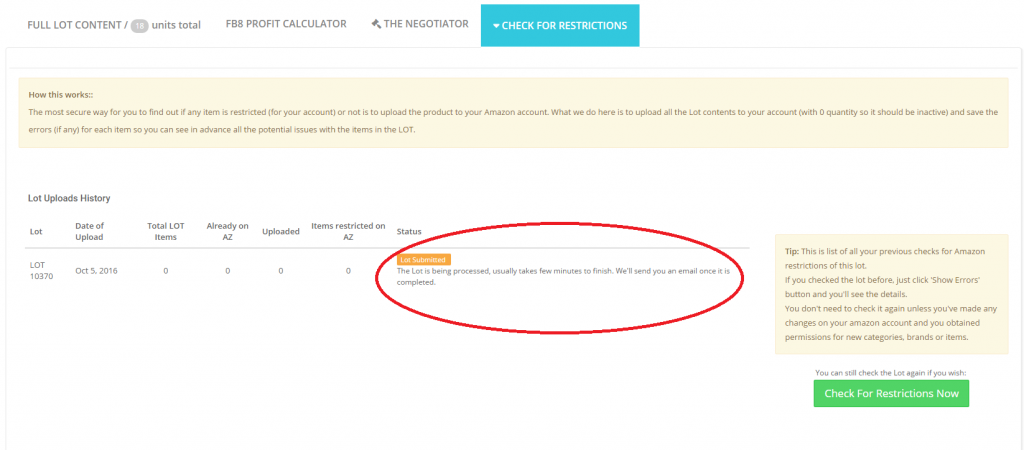
After you make the request we will send you an email once the request is finished and we have checked all of the products from the LOT.
submitted

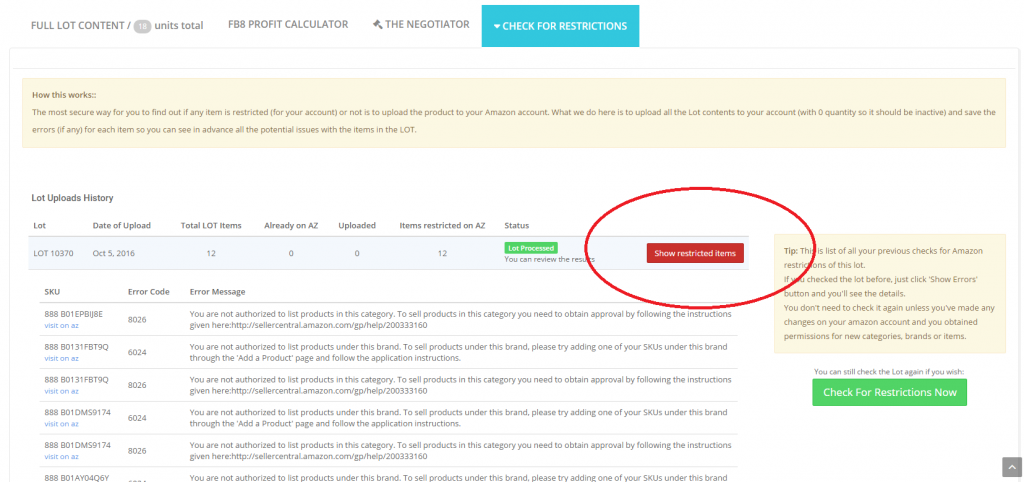
Please note that it usually takes 15 minutes to process the LOT for restrictions, but in some cases it can take up to one hour. After the process is finished you are going to receive an email from our system and you will be able to view all of the restricted products for that LOT based on your profile settings.

restricted


Below you can also view a short video of the process, how to setup you account, and how to check our LOTS for restrictions.
Please note that the data in the examples will be different for you. The restrictions are different for each seller

Monday, 19 September 2016

How To Get Approval In The Restricted Categories On Amazon


by The Selling Family

Some of the most desired categories on Amazon.com for FBA sellers require getting approval from Amazon in order to sell in them.  Part of the reason they are so desired, is because not everyone can sell in them off the bat.  That is good news for someone who is approved because there is less competition in these categories, versus the unrestricted categories.


These are the “main” categories on Amazon that currently require approval:

  • Shoes & Handbags
  • Clothing & Accessories
  • Fashion Jewelry
  • Watches
  • Beauty
  • Health & Personal Care
  • Grocery
There are a couple other categories on Amazon that require approval.  But we are going to focus on these ones today.  In our experience, these are the ones that the most sellers want to be approved in overall.

Before You Start Your Approval Process

In order to request approval to sell in the restricted categories you must meet the following criteria as an Amazon seller:
  • Be a PRO MERCHANT – this means you are paying the $39.00 a month for your seller account.
  • Order defect rate:                 < 1%
  • Pre-fulfillment cancel rate:   < 2.5%
  • Late shipment rate:              < 4%
The only reason you would fall below these as a brand new seller is if you were doing Merchant Fulfilling.  Since you are most likely just getting started, you will meet the above requirements no problem :) 

Getting Approval In Beauty, Health & Personal Care Or Groceries  

First off, we have the categories of Beauty, Health & Personal Care and Grocery.  These are some of our favorite categories here at The Selling Family and we recommend that all new sellers eventually try to get approved in them as well. Unlike the categories we talked about above, in order to get ungated in these categories, you have to provide Amazon with invoices in order to gain approval in them.  
These 3 categories have become some of the hardest categories to get approval in from Amazon.  The main reason is they aren’t specific on what they are looking for when it comes to documentation.  So, one agent will say one thing, and another says something else.
The most important thing to remember when trying for approval in these categories is to know that patience is required!  You may be doing a lot of back and forth work with Amazon.
As of right now, Amazon is requesting that sellers provide them withcommercial invoices from reputable suppliers.  Retail receipts are not an option for approval in these categories.
The best way to obtain a commercial invoice is to purchase direct from a wholesale company.  I would speak to them before placing an order to see if they will provide a commercial invoice to you at the time of purchase.

The invoice needs to include the following information:

  • The suppliers company information:  Name, Address, Phone Number and Website
Note: The suppliers website should have all of this information on the first page as well.  So they are easy to identify as a “legitimate supplier”.  Keep this in mind when you are looking for a wholesale company to use!  If you can’t find all of their contact info on page one, Amazon won’t search further than that.
  • Your company information: Company name as it appears on your Amazon seller account, Address you have on file
Note:  We have seen sellers denied simply because the name/address used wasn’t exact as shown on their Amazon file.  So make sure to include your “Official” business contact information.
To start the approval process for Beauty, click here.
To start the approval process for Health & Personal Care, click here.
To start the approval process for Grocery, click here.
Like I said previously, these 3 categories are some of the harder ones to get approved in.  But, they are worth it for those who keep working with Amazon to complete the process :)
We have a walkthrough video course that will show you the exact types of invoices required and all of the specific things that Amazon is looking for in order to approve someone in these categories!

Getting Approval In Shoes & Handbags, Clothing & Accessories, Watches Or Jewelry

Recently Amazon has changed the process for gaining approval into the categories of Shoes, Clothing, Watches & Jewelry.  
Sellers no longer need to provide images or flat files for these categories.  There is an application process where you answer multiple choice type of questions and then get an instant approval (or denial) based on your answers.
For the application, Amazon will ask you questions about the products that you intend to sell. questions about your business model and what your intentions are for the category you are applying in.  The questions are pretty basic and are about your plans as a seller.  
One important note is that when you are requesting approval in these categories, Amazon wants you to be purchasing direct from the manufacturer, or be the brand owner.  If you say no to both of these questions, you will get an automatic decline and not be able to move forward in the application process.
To start the approval process for shoes, click here.  
To start the approval process for clothing, click here.
To start the approval process for jewelry, click here.
To start the approval process for watches, click here.
Some sellers have a hard time filling out the application, so we are offering our Category Approval Application Guides for all 4 of these categories for just $25!  I recommend trying it out on your own at first, but I know some of you like to have it laid out in an easy to follow step by step process.


- Read this to find out how to get approval on the restricted categories on Amazon! 

Thursday, 1 September 2016

Amazon Brand Restrictions – What to Do?


By Jordan Malik

Unless you've been living under a rock, you know that Amazon recently emailed individual sellers telling them they couldn't sell certain brands any more. If you wanted to be approved, you had to provide real invoices from manufacturers - not retail receipts, and (in some instances) pay up to $1500 just to beconsidered.  The rumor is that Amazon did this because there were too many counterfeit products and/or sloppy sellers packaging (passing used off as new, etc.). But all (or most) sellers like you and me were affected anyway.
You probably got the "restriction" email from Amazon if you had in stock a product from a brand you were restricted from. Some sellers (like me) got no email, which (likely) means either a.) I didn't have any restricted brands in stock, or I was 'grandfathered' in to be allowed to sell it. (However, I tried listing a Lego product and Adidas product - I was restricted.) Thus, in short:

Many 3rd party sellers like you and me are restricted - without recourse - from selling products from a couple hundred brands on Amazon. Thousands of brands are notrestricted. 


Let me get the "What you should do from now on?" stuff out of the way, then further down I'll share some recommendations.
1.) What you should do from now on - Part I:  Click through and bookmark these 3 pages (3 selling experts are continuously these lists of 'known' restricted brands. This information comes from the blog owner's information, not Amazon. Instead of favoring one over the other, I'm referencing all 3 below. Note: 'Not all restrictions are created equal'. For some of the brands (e.g., Hasbro and Disney), it appears some sellers like myself were not restricted):
  • The Selling Family (Jessica Larrew) list
  • 888 Lots' list
  • Best from The Nest (Robyn Johnson) list

2.) What you should do from now on - Part II: When in doubt, use the (free) Amazon Seller App for iPhone or Android. This will instantly tell you if you are restricted from selling a product (Note: non-Amazon scouting apps like Scoutify and/or Profit Bandit don't give you these alerts!). If you're already using a scanning app like Scoutify orProfit Bandit, keep using them - they're a lot faster. Use the Amazon app if you're in doubt or you want to double-check the item:
  1. Install the Amazon Seller App on your phone/device
  2. Ensure you're logged into the App using your Amazon seller credentials
  3. Open the App, select 'product search' and touch the 'camera' icon. Then scan the barcode any item (or enter the item name/UPC, or hover the camera over the face of the item as Amazon can 'recognize' what you're scanning). Hint: if you're on (say) Walmart.com and you want to scan an item, pressing the camera icon will work in most cases if you hover your camera lens over the picture of the Walmart item as it appears on your screen.
For instance, I randomly looked up four items (those I had a hunch I'd be restricted from), using my Amazon Seller App, and yep, I was restricted. Screen shot is on the upper right of this page (click to enlarge). Not all restrictions are created equal'. For some of the brands (e.g., Hasbro and Disney), it appears some sellers like myself were not restricted.
Now for some recommendations:
First, sourcing via retail arbitrage or online arbitrage is NOT dead. It's just changing. There will always be opportunities sourcing thousands of other (non-restricted) brands from stores (physical or online). You just have to be more selective and strategic. Let's take heed from some trusted experts:
"Retail arbitrage is still a resounding 'yes' for us right now. Time will tell whether these latest changes will wind up being something whose effect was exaggerated or whether we’ll have a whole new set of guidelines from Amazon. The point is, stay agile! Those of you who are willing to take the news and roll with it are the ones who will rock your businesses in the end!" - Jessica Larrew, The Selling Family
"Retail arbitrage is not dead. It’s just different than it was a few days ago. And in a year or two, it’ll be totally different again. But with any challenge, comes opportunity. It’s what we do as entrepreneurs – Re-frame situations to create profitable businesses"- Duncan McPherson of SmartFBAIncome
"Don’t dwell in the negativity. It can be so easy to get sucked into the negativity online when difficult situations arise in the FBA selling world, especially on Facebook. You could easily spend (waste?) hours reading and participating in the comments on Facebook posts about how fill-in-the-blank change is going to ruin our existence as third party sellers on Amazon. Don’t fall victim to that temptation!" -Stephen Smotherman of Full-Time FBA.
[Move according to your tolerance for risk.] Risk Profiles:Extremely Risk Averse: Immediately remove all inventory that has been sourced via retail and online arbitrage, and stop sourcing any new products via Retail Arbitrage (RA)or Online Arbitrage (OA).Risk Averse: Stop sourcing all new RA / OA and begin to shift to purchasing inventory via other sourcing methods such as wholesale.Calculated Risk: Keep sourcing RA / OA, while monitoring Amazon’s changes. Keep 2 to 3 months inventory in stock at a given point in time to be able to adjust if a change comes through the pipeline. Don’t make any drastic changes to your business at this point in time. Ignore Risk: Keep sourcing RA /OA as you do today, and plan to continue these methods until retirement or you are suspended. Essentially, you’ve picked your path and will not deviate no matter what changes are made by Amazon." - Ryan Grant,Online Selling Experiment
Second: It's time for you to consider diversifying into one or more of: used books, wholesale and private label (it's never been less expensive/less risky to do so) to sell on Amazon. You have to do it the right way though. Learn the basics and more for free (or inexpensively) from my trusted partners:
(FREE) Online Book Arbitrage (you pay $6 S&H) by Peter Valley (one of the foremost experts on the topic)
(FREE) Private Label: Scott Voelker's workshops
(FREE) Private Label: Startup Bros' free workshops (live or replay)
(FREE/$) Private Label: Ryan Reger's Private Label The Easy Way Free webinars (limited run) and mentoring group.
($) Wholesale: Robyn Johnson's Wholesale Workshop (pre-recorded)
($) Wholesale: Proven Wholesale Sourcing (comes free when you buy The Proven Amazon Course)
($) Wholesale: Skip McGrath's Wholesale Buying System for Amazon or eBay
Third - Ensure you have an eBay account up and running (free tutorials here andhere) This is especially true since Christmas is coming (hey let's face it you need a backup). If you're a new eBay seller, start selling random stuff around your house (unwanted DVDs, CDs, t-shirts, broken electronics) now as you may have a 'probationary' period. The service Joelister (I can't vouch for how well it works) will copy your Amazon inventory to eBay, and when an eBay buyer buys your item on eBay, it's automatically removed from your Amazon account. This isn't to panic you into selling on eBay (Don't panic), this is a smart thing for any Amazon seller to have.
That's it for now. I'll have more info coming in an upcoming AskJordan podcast.
Stay well, stay focused!
(Your feedback is welcome - comment below)
-Jordan Malik

- So glad there are experts out there to guide us through all this change. How are you and your business doing?